 Solution Beast Tech Solutions

Related Articles

Ubuntu is an open-source software program platform that runs all over the place from IoT gadgets, the smartphone, the tablet, and the PC to the server and the cloud. To create a USB stick from which you’ll be able to set up Ubuntu, you will need to first obtain Ubuntu and, if you would like, confirm the obtain. Here is Learn how to create a bootable USB stick on Ubuntu.
Maximize service availability
Mission-critical workloads, comparable to enterprise databases, digital/cloud hosts, or infrastructure companies, can’t afford downtime. The Canonical Livepatch Service enables you to apply kernel fixes in seconds, without restarting your Ubuntu 16.04 LTS system. Fewer reboots mean improved service availability.
Keep safety and compliance
When a safety loophole is recognized within the Linux kernel, patching is the one option to cut back your publicity from malicious assault.
However, discovering a downtime window to deal with safety vulnerabilities might be difficult. The Canonical Livepatch Service applies Linux kernel patches without rebooting, protecting your Ubuntu 16.04 LTS techniques safe and compliant.
Built-in service supply
The Canonical Livepatch Service is out there with an Ubuntu Benefit subscription. For current prospects introducing the Canonical Livepatch Service into your current administrative processes is easy.
Then, follow these directions:-
- Insert a USB stick with at least 2GB of free space
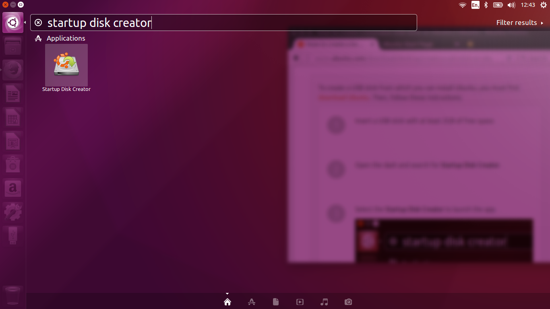
- Open the dash and search for Startup Disk Creator
- Select the Startup Disk Creator to launch the app
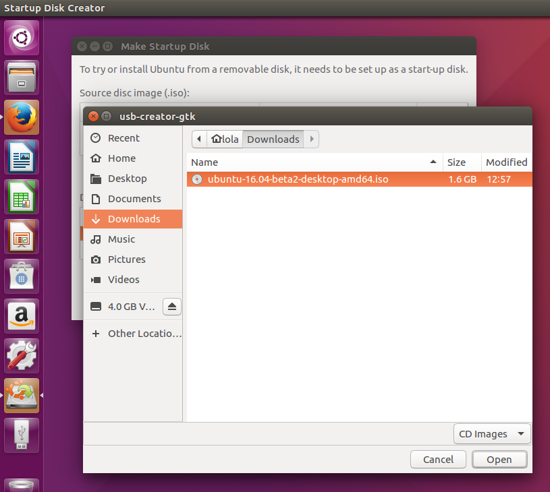
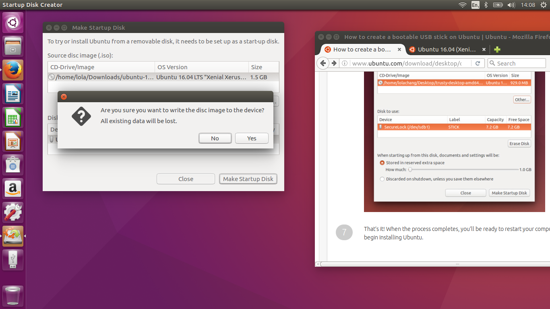
6. That is it! When the method completes, you will be able to restart your pc and start installing Ubuntu.
